
સુરક્ષા અને છેતરપિંડીથી બચાવ
Binance નામે SMS આવ્યો? નકલી SMS ઓળખો અને 1930 પર ક્યારે ફરિયાદ કરવી
Sender નામ “Binance” હોય અને message જૂના verification codeના thread માં જ આવે, છતાં SMS નકલી હોઈ શકે છે. Binanceની official FAQ પરથી ચાર પ્રકારના નકલી SMS, OTPનો હેતુ તપાસવાની રીત, account disable કરવાનો path અને ભારતમાં Chakshu, 1930 તથા cybercrime.gov.in પર ક્યારે ફરિયાદ કરવી તે સમજો.
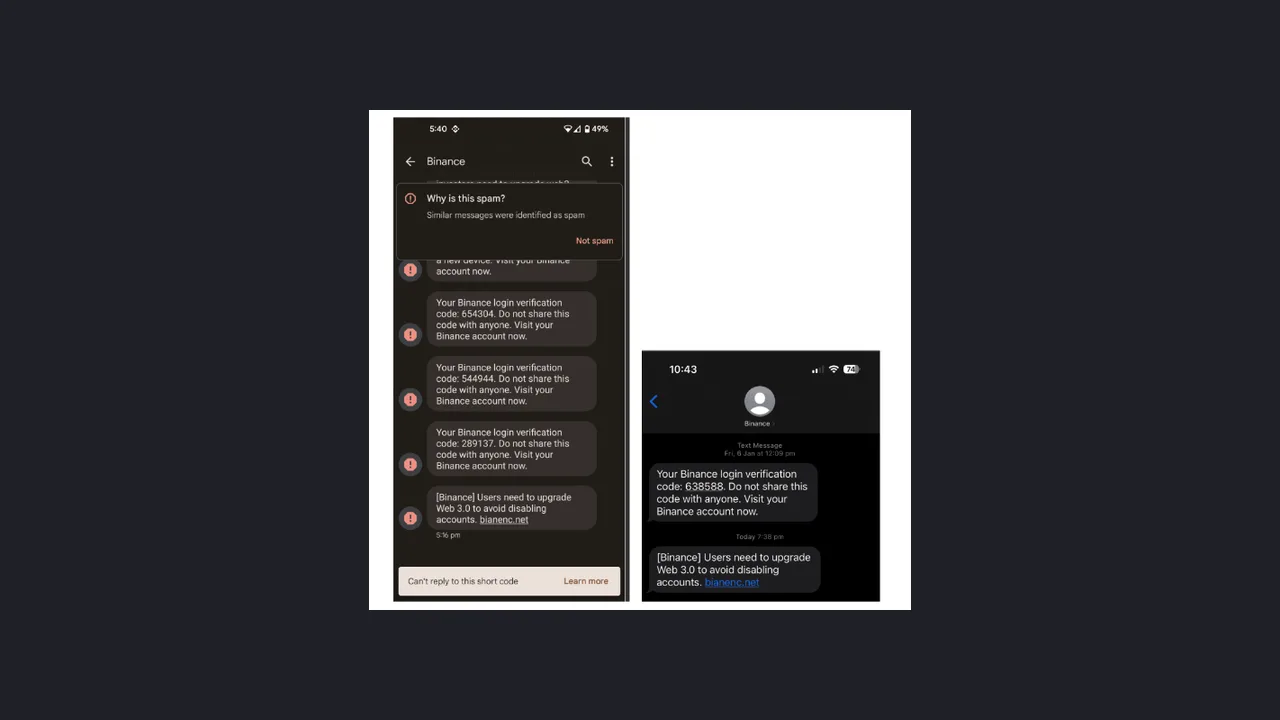
Mobile પર sender નામ “Binance” બતાવતો SMS આવે છે: account upgrade કરવું પડશે, કોઈ withdrawal રદ કરવું હોય તો link ખોલો, અથવા નવું login થયું છે એટલે તરત call કરો. અને આ message તમારા જૂના Binance verification codeની નીચે, એ જ thread માં દેખાય છે. તો પણ એ સાબિત નથી થતું કે SMS ખરેખર Binanceએ મોકલ્યો છે. નિર્ણય sender નામ પરથી નહીં, ત્રણ પ્રશ્ન પરથી લો: SMS તમને શું કરાવવા માંગે છે, તમારા accountની અંદર એવી જ ઘટના દેખાય છે કે નહીં, અને OTP SMS માં લખેલો હેતુ તમે હમણાં કરી રહેલા કામ સાથે મેળ ખાય છે કે નહીં.
આ લેખ ફક્ત Binanceના નામે આવતા નકલી SMS વિશે છે. માહિતી Binanceની official FAQ, Binance Blog અને ભારત સરકારના Sanchar Saathi portal પરથી લીધી છે; છેલ્લી ચકાસણી 13 સપ્ટેમ્બર 2026.
“Binance” sender વાળો SMS પણ નકલી કેમ હોઈ શકે?
Binanceની official FAQ “What Is SMS Spoofing and How to Avoid” (છેલ્લો સુધારો 6 ફેબ્રુઆરી 2026) સમજાવે છે કે fraudsters ખાસ software વડે SMSનું sender ID બદલી નાખે છે. પરિણામે નકલી message Binance અથવા Trust Wallet જેવા નામથી આવે છે અને 2FA code જેવા official messagesના એ જ thread માં ગોઠવાઈ જાય છે.
Phone messagesને sender નામ પ્રમાણે group કરે છે; message ખરેખર ક્યાંથી આવ્યો તે તપાસતો નથી. એટલે “જૂના OTP વાળા thread માં જ આવ્યો” એનો અર્થ માત્ર એટલો કે નામ સરખું છે—સાચો હોવાનો પુરાવો નથી.
![Binance official FAQનું SMS spoofing ઉદાહરણ: Android અને iPhone બંનેમાં sender “Binance” વાળા thread માં સાચા format ના login verification codeની નીચે “[Binance] Users need to upgrade Web 3.0 to avoid disabling accounts” લખેલો, bianenc.net નકલી link વાળો SMS](/uploads/0f700d06a667daed03e1eb29cee15ff5.webp)
સ્રોત: Binance FAQ “What Is SMS Spoofing and How to Avoid”નું “Fake account upgrade notification” ઉદાહરણ, CoinPrimerએ 13 સપ્ટેમ્બર 2026એ capture કર્યું. Imageમાંનું domain Binanceએ નકલી તરીકે બતાવેલું છે—તેને ખોલશો નહીં.
Android screenshotમાં phoneએ message ને spam તરીકે ઓળખ્યો છે, પણ દરેક phone કે દરેક નકલી SMS માં આવી ચેતવણી આવશે એવું માનશો નહીં.
નકલી SMS સામાન્ય રીતે આ ચાર કામ કરાવવા માંગે છે
Official FAQના ઉદાહરણોને ચાર પ્રકારમાં મૂકી શકાય:
| SMS શું કહે છે | સાચો હેતુ | શું કરવું |
|---|---|---|
| Account upgrade કે verify કરો, નહીં તો બંધ થશે | નકલી login page પર password લેવો | Link નહીં; bookmarkથી login કરીને accountમાં notice છે કે નહીં જુઓ |
| “આ withdrawal તમે ન કર્યું હોય તો અહીં cancel કરો” | નકલી page પર withdrawal confirm કરતો code લેવો | Link નહીં; accountમાં withdrawal history જુઓ |
| નવું login થયું છે, “તરત call કરો” | Phone પર OTP લેવો અથવા transfer કરાવવું | Call back નહીં; Devices and Activities તપાસો |
| Regulatory નિયમો માટે details કે SOW declaration ભરો | ઓળખ માહિતી અને login details ભેગા કરવા | SMSના link માં કોઈ માહિતી ન ભરો |
FAQએ બીજા બે પ્રકાર પણ લખ્યા છે: “તમે prize જીત્યા છો” કહીને bank details માંગવી, અને account ban કરવાની ધમકી આપીને ડરાવવું. આવા message માં પણ પહેલાં શાંતિથી ચકાસો, પછી જ કંઈ કરો.
Binance Blog “How to Protect Your Crypto From SMS Spoofing Attacks” (3 ઑક્ટોબર 2025) માં સ્પષ્ટ લખ્યું છે: “Binance will never send you an SMS asking you to call a number and speak to a customer support or a security department.” એટલે કે Binance ક્યારેય SMS મોકલીને કોઈ number પર call કરી customer support કે security department સાથે વાત કરવાનું નહીં કહે. SMS call કરવાનું કહે, તો તેને scam માનીને જ આગળ વધો.
OTP SMS: code નાખતા પહેલાં તેનો હેતુ વાંચો
FAQનું બીજું ઉદાહરણ ખાસ યાદ રાખવા જેવું છે. એક userને withdrawal વિશેનો નકલી SMS આવ્યો. તેણે phishing website પર login કર્યું અને માન્યું કે હવે માંગેલો 2FA code withdrawal cancel કરવા માટે છે. હકીકતમાં hackerએ તેના login detailsથી withdrawal શરૂ કરી દીધું હતું, અને એ code withdrawal confirm કરવા માટેનો હતો. Code નાખતાં જ assets ઉપડી ગયા.
![Binance official FAQનું fake withdrawal cancellation ઉદાહરણ: cancel થી શરૂ થતા નકલી link વાળો “[BINANCE] Transfer code” SMS, તેના પછી નકલી Binance Account Login page અને “Do you recognize this transaction?” page; ઉદાહરણમાંનું નામ અને wallet address blur કરેલું છે](/uploads/b62bcc5bf79d12cc384880b0c42b1558.webp)
સ્રોત: એ જ Binance FAQનું “Fake withdrawal cancellation request” ઉદાહરણ, 13 સપ્ટેમ્બર 2026એ capture; ઉદાહરણમાંનું નામ અને address CoinPrimerએ blur કર્યું છે.
કોઈ પણ code નાખતા પહેલાં બે પ્રશ્ન પૂછો:
- આ કામ મેં હમણાં જ binance.com અથવા official Appમાં જાતે શરૂ કર્યું છે? ના, તો code ક્યાંય ન નાખો અને કોઈને ન કહો—“support”ને પણ નહીં.
- SMS માં લખેલો હેતુ અને મારું હાલનું કામ એક જ છે? તમે login કરી રહ્યા છો અને SMS withdrawal અથવા નવું address લખે છે, તો ત્યાં જ અટકી જાઓ.
તમે કંઈ કર્યું ન હોય છતાં સાચા formatનો login અથવા withdrawal code આવે, તો કોઈ તમારા accountમાં પ્રવેશવાનો પ્રયાસ કરતું હોઈ શકે છે. તેનો અર્થ account hack થઈ ગયું એવો જરૂરી નથી, પણ official રસ્તે account activity તરત તપાસો અને password બદલવાનો વિચાર કરો.
SMS માંનું કંઈ પણ ખોલ્યા વગર ચાર stepમાં ચકાસો
Step 1: Link ન ખોલો, call back ન કરો, reply ન કરો. SMS માંનો link, phone number અને “cancel કરવા 1 લખો” જેવી સૂચના—કશાને હાથ ન લગાડો.
Step 2: તમારા પોતાના રસ્તે account activity જુઓ. Save કરેલા binance.com bookmark અથવા official Appથી login કરો. FAQ મુજબ path:
- App: [Profile] → [Account Info] → [Security] → [Account Activities]
- Website: [Profile] → [Account] → [Security] → [Devices and Activities]
Accountમાં એવું login, withdrawal અથવા notice ન દેખાય, તો SMSને ignore કરીને report કરી શકો. FAQ એ પણ કહે છે કે નકલી SMS કે call આવવાનો અર્થ એ નથી કે તમારું Binance account hack થઈ ગયું છે.
Step 3: Binance Verify અથવા Support chatbotથી તપાસો. FAQ મુજબ link, email, phone number, WeChat ID, Twitter account અથવા Telegram ID official છે કે નહીં તે Binance Verify પર ચકાસી શકાય. SMSનો screenshot Binance Supportના chatbotમાં upload કરીને પણ ઝડપી check કરી શકાય છે. ધ્યાન રાખો: Verify page પોતે કહે છે કે તે માત્ર સહાયક ચકાસણી સાધન છે. Number official નીકળે તો પણ call કે SMS માં માંગેલું દરેક કામ authorized છે એવું સાબિત નથી થતું.
Step 4: Anti-Phishing Code છે કે નહીં જુઓ. Binanceએ Anti-Phishing Codeને email ઉપરાંત SMS સુધી લંબાવ્યો છે. Set કર્યા પછી Binanceના SMS માં ફક્ત તમને ખબર હોય એવો code દેખાય છે. FAQનો setup path:
- App: [Profile] → [Account Info] → [Security] → [Anti-Phishing Code]
- Website: [Profile] → [Account] → [Security] → [Advanced Security]
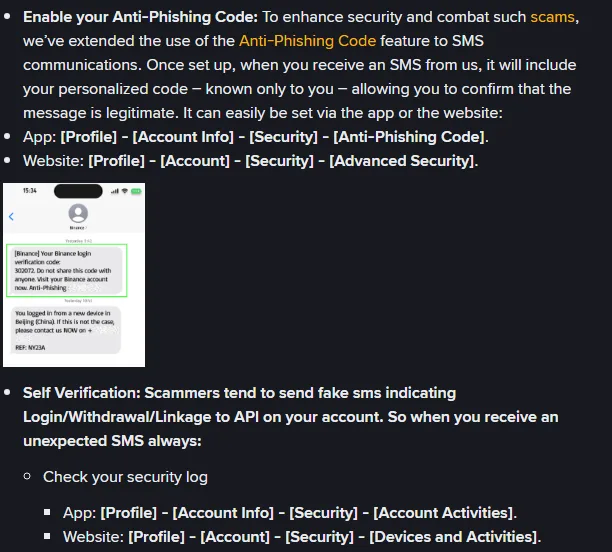
સ્રોત: Binance FAQ “What Is SMS Spoofing and How to Avoid”, 13 સપ્ટેમ્બર 2026એ capture.
આ stepની બે મર્યાદા પહેલેથી જાણો:
- બીજી official FAQ “How to Protect Your Crypto from Phishing SMS with Anti-Phishing Code?” (સુધારો 7 ફેબ્રુઆરી 2026) મુજબ SMS anti-phishing code ફક્ત પસંદ કરેલા દેશોના users માટે અને કેટલાક SMS માં જ આવે છે. FAQ માં દેશોની યાદી નથી અને ભારતનું નામ પણ નથી. એટલે ભારતમાં તમને આવતા દરેક Binance SMS માં code આવશે જ, એવું અમે કહી શકતા નથી.
- Code ન હોય તો વધુ સાવધ રહો, પણ code હોય તો પણ SMSના link પર જવાનું કારણ નથી. FAQ મુજબ code 6 થી 8 charactersનો હોય અને uppercase, lowercase, digits, underscore માંથી ઓછામાં ઓછા ત્રણ પ્રકાર હોય. Password, જન્મતારીખ અથવા mobile numberને code ન બનાવો.
2FA, Passkey, devices અને withdrawal security એક સાથે set કરવા deposit પહેલાંની Binance account સુરક્ષા checklist અનુસરો.
Link ખોલી નાખ્યો કે details નાખી દીધી? આ ક્રમમાં પગલાં લો
માત્ર page ખુલ્યું, કંઈ નાખ્યું નથી અને download નથી કર્યું: page બંધ કરો, કોઈ file install ન કરો, અને bookmarkથી login કરીને activity જુઓ.
Password કે OTP નાખી દીધો, અથવા અજાણ્યું login કે withdrawal દેખાય છે: પહેલાં account disable કરો. Binance FAQ “How to Disable My Binance Account” (સુધારો 24 નવેમ્બર 2025) મુજબ:
- App: [Account Info] → [Security] → [Manage Account] → [Disable Account]
- Website: [Account] → [Security] → Account Management વિભાગમાં Disable
આ માટે security verification પૂર્ણ કરવું પડે છે, અને પછી account ફરી ચાલુ કરવા Binanceની unlock process અનુસરવી પડે છે. એટલે જ્યારે લાગે કે બીજું કોઈ તમારું account ચલાવી રહ્યું છે, ત્યારે આ પગલું વાપરો.
Crypto બહાર જતું રહ્યું: Binance FAQ “How to Report Scams on Binance Support” મુજબ Binance Supportના Self Service માં “Non-P2P Related Scam Report” પસંદ કરી શકાય, અથવા fraudulent transactionના details page પર [Report Scam] દબાવી શકાય. આ વિગતો તૈયાર રાખો:
- TxID, તારીખ, રકમ અને scammerનું wallet address;
- નકલી SMSનો screenshot, તેમાંનો link અને phone number;
- scammer સાથેની chatના screenshots.
એ જ FAQ સ્પષ્ટ કહે છે કે blockchain transactions irreversible છે. Binance ફરિયાદની તપાસ કરે છે, પણ પૈસા પાછા મળશે એવી ખાતરી નથી, અને FAQ law enforcementને પણ report કરવાની સલાહ આપે છે.
ભારતમાં ક્યાં ફરિયાદ કરવી: Chakshu કે 1930?
Department of Telecommunicationsના Sanchar Saathi portal પરનું Chakshu page (page પર “Website Last Updated: 09-09-2026”) પરિસ્થિતિ પ્રમાણે રસ્તો અલગ પાડે છે:
- પૈસા ગયા નથી, પણ શંકાસ્પદ SMS, call કે WhatsApp message આવ્યો છે: Chakshu – Report Suspected Fraud પર report કરો. Page મુજબ action માટે 30 દિવસની અંદર report કરવું. Pageના ઉદાહરણોમાં Bank Account, Payment Wallet, SIM, KYC update અને સરકારી અધિકારી બનીને છેતરપિંડી જેવા કિસ્સા છે.
- Consent વગરનો સામાન્ય promotional spam: એ જ page પર અલગ “Report Spam (UCC)” વિકલ્પ છે; તેમાં પણ 30 દિવસની અંદર report કરવાનું લખ્યું છે.
- પૈસા ગુમાવી દીધા છે: Chakshu pageની નોંધ મુજબ cyber crime helpline 1930 પર call કરો અથવા cybercrime.gov.in પર ફરિયાદ નોંધાવો. PIBની માહિતી મુજબ 1930 એ ગૃહ મંત્રાલયની toll-free helpline છે, જે financial fraudની તાત્કાલિક ફરિયાદ અને National Cyber Crime Reporting Portal પર complaint નોંધાવવામાં મદદ માટે છે.
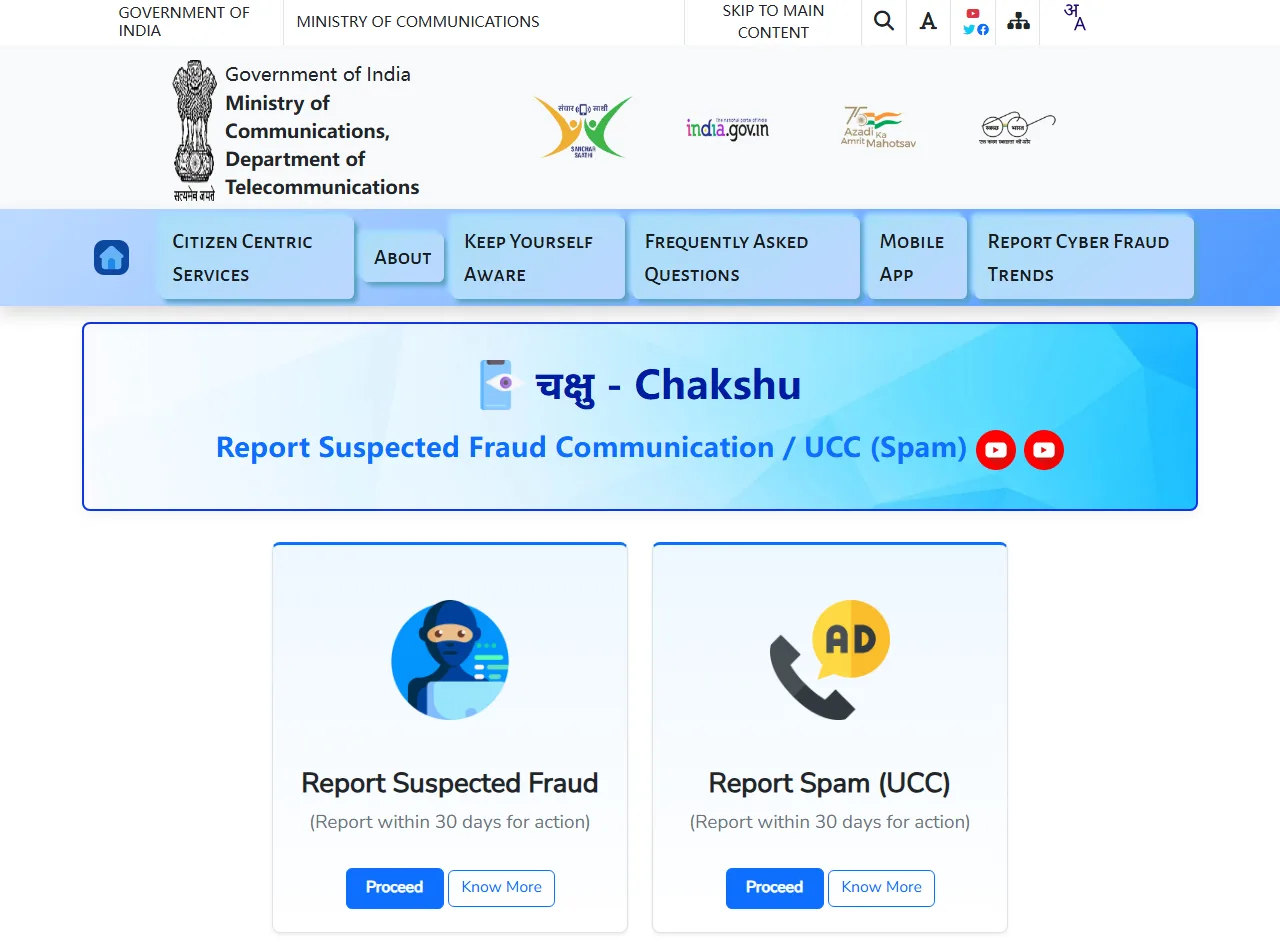
સ્રોત: sancharsaathi.gov.in/sfc, CoinPrimerએ 13 સપ્ટેમ્બર 2026એ login વગર capture કર્યું; imageમાં કોઈ વ્યક્તિગત માહિતી નથી.
ફરિયાદ પહેલાં નકલી SMS delete ન કરો; sender નામ, સમય અને link દેખાય એવો screenshot રાખો. PIB મુજબ 1930 પર ઝડપી ફરિયાદથી શક્ય હોય ત્યાં fraudulent transaction freeze કરવામાં મદદ મળે છે, એટલે bank કે UPIથી પૈસા ગયા હોય તો મોડું ન કરો. પરંતુ blockchain પર મોકલેલું crypto પાછું ખેંચી શકાતું નથી, તેથી ફરિયાદથી રકમ પાછી મળશે એવી ખાતરી નથી.
ફરિયાદ પછી કોઈ “crypto પાછું અપાવીશું” કહીને પહેલાં fee કે deposit માંગે, તો તે પણ scam છે.
P2Pમાં બીજો એક સામાન્ય દાવો છે: “bankમાં પૈસા જમા થઈ ગયા”. Sellerએ SMS કે screenshot જોઈને નહીં, પોતાના bankમાં real credit જોઈને જ crypto release કરવું જોઈએ; વિગત માટે Binance P2P પર USDT સુરક્ષિત રીતે ખરીદવાની guide જુઓ.
30 સેકન્ડ checklist
- SMS link ખોલીને login, upgrade, verify અથવા cancel કરવાનું કહે છે → અટકો
- SMS કોઈ number પર call કરીને “support” અથવા “security” સાથે વાત કરવાનું કહે છે → અટકો
- OTP SMSનો હેતુ મારા હાલના કામ સાથે મેળ ખાતો નથી → code ન નાખો
- Bookmarkથી login કર્યા પછી accountમાં આવી કોઈ activity નથી → ignore કરો અને Chakshu પર report કરો
- Details નાખી દીધી અથવા અજાણી activity દેખાય છે → account disable → Binanceને report → પૈસા ગયા હોય તો 1930
સ્રોત અને ચકાસણી
- Binance FAQ: What Is SMS Spoofing and How to Avoid (સુધારો 6 ફેબ્રુઆરી 2026)
- Binance FAQ: How to Protect Your Crypto from Phishing SMS with Anti-Phishing Code? (સુધારો 7 ફેબ્રુઆરી 2026)
- Binance Blog: How to Protect Your Crypto From SMS Spoofing Attacks (3 ઑક્ટોબર 2025)
- Binance FAQ: How to Disable My Binance Account (સુધારો 24 નવેમ્બર 2025)
- Binance FAQ: How to Report Scams on Binance Support
- Binance Verify
- Sanchar Saathi: Chakshu – Report Suspected Fraud Communication
- PIB: Cyber Frauds Helpline (1930)
- National Cyber Crime Reporting Portal
છેલ્લી ચકાસણી: 13 સપ્ટેમ્બર 2026. Menu નામ, anti-phishing codeની ઉપલબ્ધતા, report વિકલ્પો અને સરકારી portal બદલાઈ શકે છે; તે સમયે official page પર જે દેખાય તે જ માન્ય ગણો.
Binance account હજી નથી? પહેલાં BI27XB92 સાથે નોંધણી પહેલાંની ગુજરાતી checklist વાંચો. Official invitation link https://www.binance.com/join?ref=BI27XB92 છે; trade fee rebate મહત્તમ 20% સુધી છે, અને registration page પર તે સમયે જે દેખાય તે જ માન્ય. આ linkથી eligible registration થાય તો CoinPrimerને referral commission મળી શકે છે.