
Binanceની શરૂઆત
Binance Spot fee કેવી રીતે ગણાય?
Binance Spot tradeમાં fee કયા amount પર લાગે છે, Maker કે Taker કેવી રીતે નક્કી થાય છે અને BNB discount તથા invitation rebateને અલગ કેવી રીતે ચકાસવું તેની ગુજરાતી ગણતરી માર્ગદર્શિકા.
Binance Spot fee ગણવા માટે પહેલાં tradeનું executed value અને તમારા account પર લાગતો Maker અથવા Taker rate જાણવો જરૂરી છે. સરળ સૂત્ર છે:
દરેક fillનું price × quantity × તે fillનો fee rate
આ લેખમાં futures, margin interest, cardથી Buy Crypto, withdrawal અથવા blockchain network fee સામેલ નથી. તે અલગ ખર્ચ છે. અહીંનો હેતુ એ છે કે order મૂકતાં પહેલાં અંદાજ કાઢી શકાય અને order ભરાયા પછી actual commission સાથે તેને સરખાવી શકાય.
Public fee page હાલમાં શું બતાવે છે?
CoinPrimerએ 10 ઑગસ્ટ 2026 (UTC+8)ના રોજ logged-out Binance Fees & Transactions Overview તપાસ્યું. Spot & Margin tableમાં Regular User માટે Maker/Taker 0.100% / 0.100% અને BNB 25% off columnમાં 0.07500% / 0.07500% દેખાયું. VIP 1થી VIP 9 માટે 30-day volume અને BNB balance આધારે અલગ rows છે.
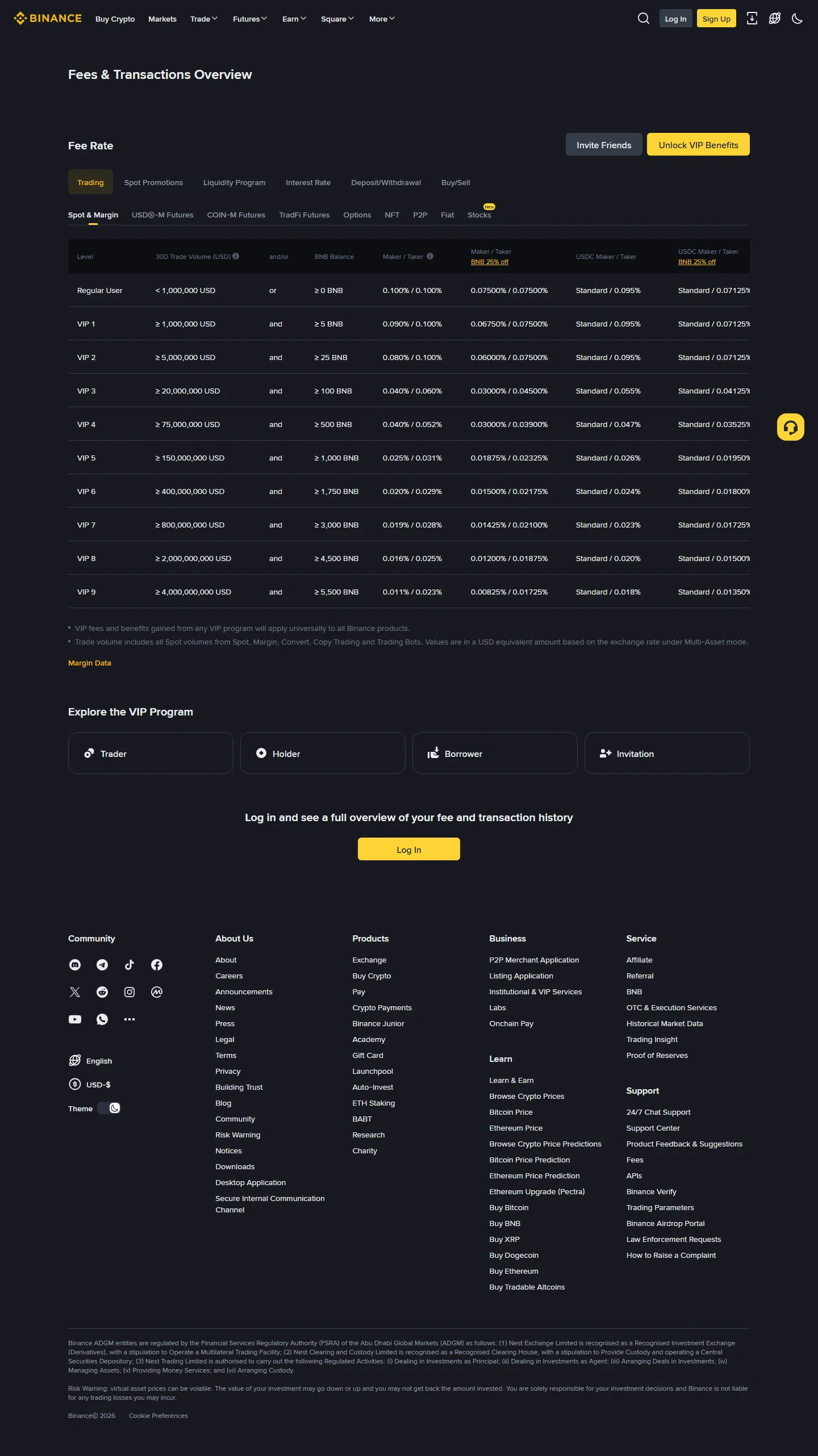
Source: Binance official Spot Trading Fee Rate, 10 ઑગસ્ટ 2026. Screenshot logged-out public pageનો છે; તેમાં email, UID, balance, Cookie, Token અથવા internal account URL નથી. Rates બદલાઈ શકે છે.
આ public rowને starting point માનો, final bill નહીં. તમારો region, VIP tier, trading pair promotion, product અને BNB setting અલગ result આપી શકે છે. Login પછી account fee page તથા order confirmationમાં દેખાતી માહિતી વધારે મહત્વની છે.
0.100%નો અર્થ 1% નથી
નવા વપરાશકર્તા percentage વાંચતી વખતે decimal ખોટી જગ્યાએ મૂકે છે.
1% = 0.010.1% = 0.0010.075% = 0.00075
ઉદાહરણ તરીકે, 25,000 INR જેટલી valueનું Spot execution થયું અને illustrative rate 0.100% હોય, તો fee valueનો અંદાજ:
25,000 × 0.001 = 25 INR equivalent
આ INRમાં જ deduct થશે એવું જરૂરી નથી. Pair અને trade direction પ્રમાણે commission bought/sold assetમાં અથવા BNB setting ચાલુ હોય તો BNBમાં આવી શકે છે. Actual asset માટે trade historyનો Commission અથવા Fee field જુઓ.
જો એ જ executed value પર account ખરેખર 0.07500% BNB rate મેળવતું હોય:
25,000 × 0.00075 = 18.75 INR equivalent
આ માત્ર fee comparison છે. Crypto price movement, spread અને INR deposit/on-ramp cost અહીં સમાવ્યાં નથી.
Market order અને Limit orderમાં Maker કોણ?
Maker order bookમાં liquidity ઉમેરે છે; Taker પહેલેથી રહેલી liquidity તરત લે છે. Market order સામાન્ય રીતે તરત execute થાય છે, એટલે સામાન્ય રીતે Taker. પરંતુ “Limit” લખેલું હોય એટલે automatically Maker નહીં.
માનો BTC/USDTમાં best ask 60,000 છે:
- 59,900 પર Limit Buy મૂક્યું અને તે bookમાં રાહ જુએ, પછી seller આવે—fill Maker હોઈ શકે.
- 60,100 પર Limit Buy મૂકતાં તે 60,000ની existing ask સામે તરત execute થાય—fill Taker બની શકે.
- મોટી order અનેક prices પર split થાય; દરેક fillની role અને amount trade historyથી ચકાસવી જોઈએ.
Binance Academyનો current fee guide પણ maker/taker role, VIP tier, BNB અને promotionsને અલગ factors તરીકે સમજાવે છે. Order typeનું નામ જોઈને fee spreadsheetમાં role lock કરશો નહીં.
એક order અનેક fillsમાં ભરાય તો ગણતરી કેવી રીતે કરવી?
માનો USDTથી crypto ખરીદતી order આ રીતે ભરાઈ:
| Fill | Executed value | Example rate | Estimated fee value |
|---|---|---|---|
| A | 400 USDT | 0.100% | 0.400 USDT equivalent |
| B | 350 USDT | 0.100% | 0.350 USDT equivalent |
| C | 250 USDT | 0.100% | 0.250 USDT equivalent |
| Total | 1,000 USDT | — | 1.000 USDT equivalent |
જો કોઈ fillનો role અથવા promotional rate અલગ હોય, તો તે rowમાં અલગ rate મૂકો. Total order valueને એક જ rateથી ગુણાકાર કરવાથી estimate સરળ બને છે, પરંતુ reconciliation માટે per-fill calculation વધારે વિશ્વસનીય છે.
BNB 25% off લાગ્યો છે કે નહીં તે કેવી રીતે ખબર પડે?
Public tableમાં BNB discount માટે અલગ column છે. એટલે તે referral code નથી અને invitation rebateનો પુરાવો પણ નથી. નીચેના પાંચ checks કરો:
- Fee settingsમાં BNBથી trading fee ચૂકવવાનો option ચાલુ છે?
- Fee deduct કરવા પૂરતું BNB balance છે?
- આ Spot pair અથવા promotion BNB discount માટે eligible છે?
- Accountના current fee page પર discounted rate શું દેખાય છે?
- Trade historyમાં commission ખરેખર BNBમાં deduct થયું છે?
Setting એક વખત ચાલુ કર્યું હતું એટલા માટે દરેક future tradeમાં discount લાગશે એવું માનશો નહીં. BNB balance ઓછું થાય, product બદલાય અથવા promotion બદલાય તો actual deduction જુદું હોઈ શકે છે.
BI27XB92નું “Up to 20% Trade Rebates” ક્યાં લાગુ પડે છે?
CoinPrimerની ચકાસેલી registration link https://www.binance.com/join?ref=BI27XB92 છે. Registration page પર “Up to 20% Trade Rebates” દેખાયું. “Up to” upper limit છે; fixed 20% guarantee નથી.
Binance Referral Program Terms (effective 5 January 2026) મુજબ rewards eligible trading fees અને Binance દ્વારા સમયાંતરે નક્કી થતી અન્ય criteria પર આધારિત હોય શકે છે. Eligibility region પ્રમાણે ઉપલબ્ધ ન પણ હોય અને calculation બદલાઈ શકે છે. તેથી BNB discount તથા referral rebateને આંખ બંધ કરીને multiply કરવું યોગ્ય નથી.
Eligible feeને F કહીએ તો માત્ર mathematical ceiling સમજવા માટે:
maximum possible rebate at a full 20% rate = F × 0.20
જો F 1 USDT equivalent હોય તો 20% ceiling 0.20 USDT equivalent થાય. પરંતુ F BNB discount પહેલાં કે પછી કયા amount પરથી નક્કી થાય છે, actual account rate કેટલી છે, reward કઈ assetમાં અને ક્યારે મળે છે—આ બધું account recordથી જ ચકાસવું. 0.100% × 75% × 80% = 0.060%ને દરેક માટે “final fee” તરીકે લખવું misleading છે.
નવું account બનાવતાં પહેલાં BI27XB92 Gujarati verification checklist વાંચી શકો છો.
Binance official registration page પર code અને હાલની benefit line ચકાસો
આ linkથી eligible user register કરે તો CoinPrimerને referral commission મળી શકે છે. Fee benefit trading માટે દબાણ બનવું જોઈએ નહીં; region availability, account safety અને loss risk પહેલાં આવે છે.
Trading fee, spread અને withdrawal fee એક નથી
એક purchase પછી balance ઓછું લાગે ત્યારે બધું “Binance fee” કહેવાથી root cause મળતો નથી. અલગ records જુઓ:
- Spot trading fee: executed trade પર Maker/Taker rate.
- Spread: best bid અને ask વચ્ચેનો ફરક; Convert અથવા instant quoteમાં explicit feeથી અલગ હોઈ શકે છે.
- Slippage: order bookની depthને કારણે expected કરતાં જુદા prices પર fills.
- Deposit/on-ramp cost: bank, card, P2P અથવા third-party quoteનો ખર્ચ.
- Withdrawal/network fee: Binanceમાંથી બહાર address પર asset મોકલતી વખતે coin અને network પ્રમાણે બતાવાતી fee.
Buy, Deposit, Transfer અને Withdrawનો ફરક સમજ્યા વગર Spot fee rebateને withdrawal saving ન માનો. Referral headline network fee ઘટાડે છે એવો અર્થ નથી.
Actual commission match ન થાય તો શું નોંધવું?
Third-party supportને password કે OTP આપવાને બદલે આ evidence તૈયાર કરો:
- trading pair અને Spot product;
- order ID તથા execution time;
- દરેક fillનું price અને quantity;
- Maker/Taker role;
- account fee rate અને VIP tier;
- BNB fee setting તથા actual commission asset;
- zero-fee અથવા pair promotion હતું કે નહીં.
Expected અને actual વચ્ચેનો ફરક પહેલાં per-fill rounding, different rate અથવા BNB balanceથી સમજાવો. હજુ match ન થાય તો Binanceની official support channelમાં પૂછો. Screenshot મોકલવો પડે તો email, UID, balance, order details જેટલી જરૂરી ન હોય તેવી sensitive માહિતી mask કરો; API key, Cookie, Token, password અને verification code ક્યારેય ન મોકલો.
Trade પહેલાં 60-second fee check
- Product Spot છે?
- Public row નહીં, મારું account rate શું છે?
- Order તરત fill થઈ Taker બની શકે છે?
- BNB payment ચાલુ છે અને balance પૂરતું છે?
- Pair પર special fee/promotion છે?
- Estimated fee સાથે spread અને slippage અલગ ગણ્યા છે?
- Trade પછી actual Commission record ચકાસીશ?
Fee 0.1% કે 0.075% સમજવાથી price-lossનું risk દૂર થતું નથી. Beginner માટે position size, no leverage અને exit plan fee discount કરતાં વધારે મહત્વના હોઈ શકે છે.
Sources અને verification
- Binance official Spot Trading Fee Rate — public Regular User, VIP, Maker/Taker અને BNB columns.
- Binance Academy: How to Calculate Transaction Fees — formula, fills, Maker/Taker અને discount factors.
- Binance Referral Program Terms, effective 5 January 2026 — eligibility અને rewards calculation limitations.
- Binance official BI27XB92 registration link — code તથા pageની current benefit wording.
Facts અને screenshots છેલ્લે 10 ઑગસ્ટ 2026 (UTC+8)ના રોજ verify કર્યાં. આ educational fee-estimation guide છે; investment, legal અથવા tax advice નથી.