
એક્સચેન્જ અને વૉલેટ
Binance deposit ન આવ્યું? TxID તપાસ
Funds sender પરથી કપાયા પરંતુ Binanceમાં credit ન થયા, અથવા withdrawal Pending છે? TxID છે કે નહીં, chain status અને confirmations પરથી યોગ્ય next step પસંદ કરો.
Binance deposit balanceમાં ન દેખાય કે withdrawal લાંબા સમયથી Pending હોય ત્યારે પહેલાં balance refresh કરતાં વધુ જરૂરી પ્રશ્ન છે: TxID મળ્યો છે કે નહીં અને blockchain પર તેનો status શું છે? TxID વગર transaction હજી sending platformની અંદર હોઈ શકે છે. TxID Pending હોય તો networkની રાહ છે. Success અને પૂરતા confirmations છતાં credit ન મળે ત્યારે address, network, token contract અને Memo તપાસવાની જરૂર છે.
આ લેખ માત્ર on-chain crypto deposit/withdrawal માટે છે; bank, card અથવા P2P fiat payment માટે નહીં. Status અને required confirmations coin/network પ્રમાણે બદલાય છે. Verification date: 10 August 2026.
Support પહેલાં આ details ભેગી કરો
- Coin અને amount;
- Network, જેમ કે TRC20/ERC20/BEP20;
- From અને To address;
- TxID/TxHash;
- Sent time;
- Binance Transaction History status અને confirmation progress.
Receipt screenshot મદદરૂપ હોઈ શકે છે, પણ on-chain proof TxID છે. UID, Email, balance અને 2FA details public groupમાં ન મૂકો.
Sender પરથી amount કપાયું, પણ TxID નથી
TxID ન હોય તો transaction blockchain પર broadcast થયું હોવાની સાબિતી નથી. તે wallet queue, exchange review અથવા internal processingમાં હોઈ શકે છે.
- External wallet: activityમાં queued/submitted status જુઓ;
- Other exchange: withdrawal history અને support તપાસો;
- Binance withdrawal: Processing અને no TxID હોય તો Withdrawal Historyમાં notification જુઓ.
Internal order numberને TxID ન માનો. Explorer પર order number search કરવાથી result નહીં મળે.
TxID છે, status Pending છે
Transaction network પર છે પરંતુ blockમાં final/confirmed નથી. Congestion, low gas setting અથવા temporary delay કારણ હોઈ શકે છે. Exact minutesની guarantee આપી શકાય નહીં.
આ સમયે:
- સાચા chain explorerમાં confirmations જુઓ;
- same address પર duplicate large transfer ન કરો;
- Self-custody wallet હોય અને replace/speed-up સમજતા હોવ તો માત્ર official wallet feature વાપરો;
- Exchange withdrawal હોય તો acceleration sender platformના controlમાં છે.
BTC, Ethereum, TRON અને BSC માટે block time અને Binance required confirmations અલગ હોઈ શકે છે.
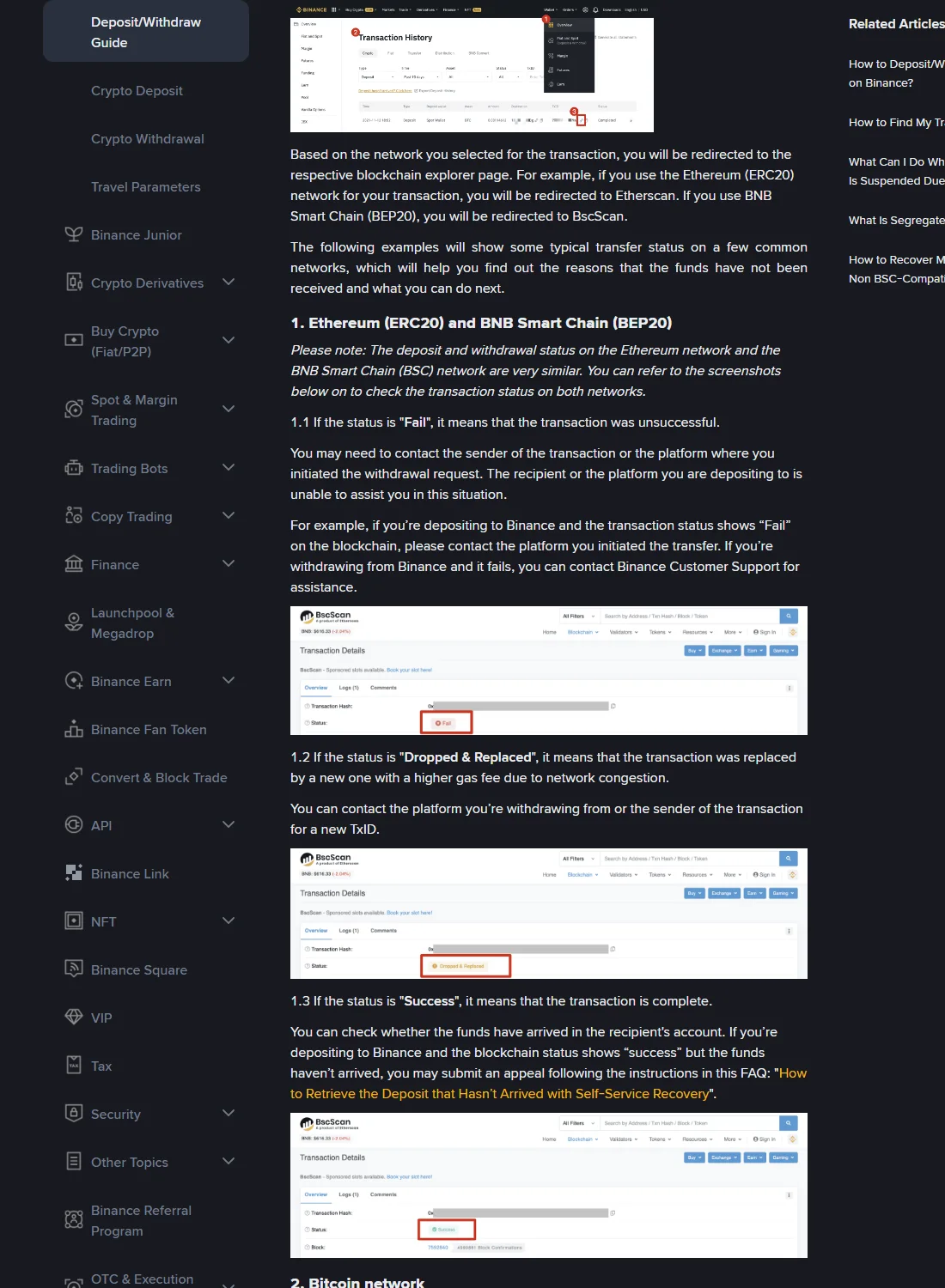
TxID Failed અથવા Dropped & Replaced છે
Failed transaction receiving address સુધી successful રીતે પહોંચ્યું નથી, જોકે gas fee લાગી શકે છે. Sender wallet/exchangeમાં balance/refund જુઓ અને failureનું કારણ સુધાર્યા પછી જ resend કરો.
Dropped & Replaced હોય તો original hashને higher-fee/new transactionએ replace કર્યો હોઈ શકે છે. New TxID sender પાસેથી લો.
Blockchain Success છતાં Binance credit કેમ નથી?
Success પછી પણ Binance account credit માટે આ checks બાકી હોઈ શકે છે:
- Required confirmations પૂરાં થયા?
- To address સંપૂર્ણપણે તમારા Binance deposit address જેવું છે?
- Sender network અને selected deposit network identical છે?
- Token contract Binance supported assetનું જ છે?
- Memo/Tag/Payment ID જરૂરી હતું અને સાચું છે?
- Amount minimum deposit thresholdથી ઉપર છે?
- Network deposit maintenanceમાં નથી?
Network અથવા Memo mismatch મળે તો wrong-network recovery guide અનુસરો; ફક્ત વધુ રાહ જોવાથી mismatch ઠીક થતું નથી.
Transaction History statusને કેવી રીતે વાંચવું?
Official web path સામાન્ય રીતે Assets → Overview → Transaction History છે. Version પ્રમાણે menuનું નામ બદલાય, પરંતુ recordમાં coin, amount, network, status, address અને TxID મળવા જોઈએ.
| Status | અર્થ | Action |
|---|---|---|
| Processing, no TxID | Internal review / queue | Screen notification જુઓ; expected time પછી official support |
| TxID Pending | Broadcast થયું, unconfirmed | Explorer monitor કરો |
| Failed | Chain execution failed | Sender side refund / retry check |
| Success, confirmations ઓછા | Normal wait | Required count સુધી wait |
| Success, enough confirmations, correct details | Credit delay / manual identification | Deposit Status Query અથવા official support |
| Success, wrong network / address / Memo | Transfer error | Recovery eligibility check; guarantee નહીં |
Withdrawal Pending હોય તો
- Withdrawal Historyમાં Cancel option અને TxID જુઓ.
- No TxID એટલે blockchain પર કંઈ track કરવાનું નથી; Binance processing છે.
- TxID દેખાય પછી explorer status primary evidence છે.
- Success છતાં receiver credit ન કરે તો receiving platformને TxID, network, amount, address આપો.
- Wrong address confirmed થઈ ગયું હોય તો blockchain reversal સામાન્ય રીતે શક્ય નથી.
“Confirmed transaction cancel કરી આપું” કહી seed phrase અથવા upfront fee માંગનાર scammer છે.
Self-Service Recovery ક્યારે?
Transaction Success છે, address Binanceનો છે, પરંતુ missing Memo અથવા eligible identification issueને કારણે credit નથી—ત્યારે account Deposit Status Query/Self-Service Recovery બતાવી શકે છે. Official page પર TxID, coin, amount, network અને sender address submit કરવું પડે.
Application accepted થવું recovery completed હોવાની guarantee નથી. Fee અને processing time case તથા current page પ્રમાણે બદલાય.
Safe escalation checklist
- Binance app અથવા binance.comમાંથી જ support ખોલો;
- Seed phrase/private key ક્યારેય share ન કરો;
- Screenshotsમાં Email, UID, unrelated balance hide કરો;
- New routeમાં small test transfer કરો;
- Credit ન થાય ત્યાં સુધી TxID અને withdrawal proof રાખો;
- Pressureમાં duplicate transfer ન કરો.
Fund flow માટે Buy, Deposit, Transfer અને Withdraw guide વાંચો.
Binance account ન હોય તો
BI27XB92 checklist પછી Binance official referral link ખોલી શકો છો. Up to 20% rebateની eligibility region અને registration terms પર આધારિત છે.
Affiliate disclosure: Link referral link છે; eligible activityથી siteને reward મળી શકે છે.
Official sources
- Binance Transaction Status Guide
- Binance Self-Service Deposit Recovery
- Binance Academy Deposit Guide
છેલ્લી ચકાસણી: 10 August 2026 (UTC+8). Status namesને fixed processing-time promise ન માનો.