
Binanceની શરૂઆત
Binance KYC નિષ્ફળ? Checklist
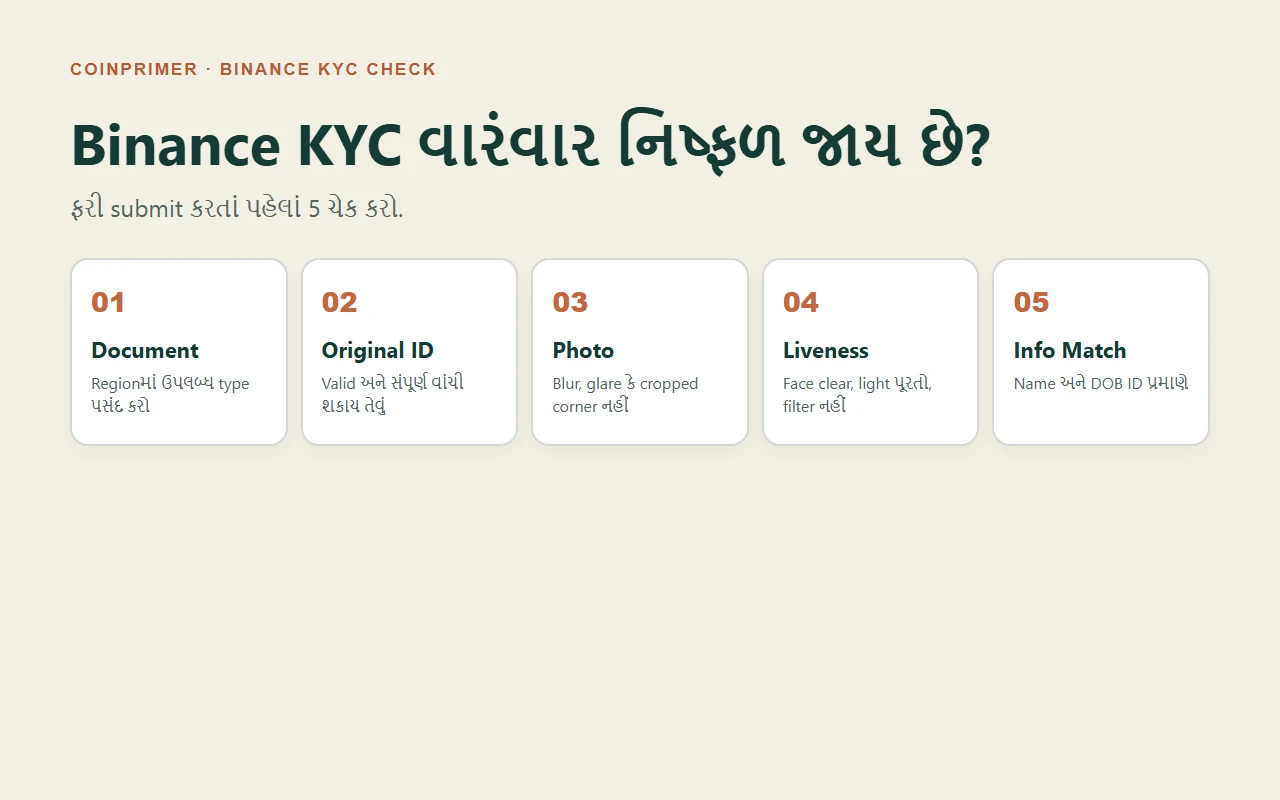
Binance KYC rejected થાય ત્યારે region, document type, original ID, photo quality, liveness અને name/DOB matchને official screens સાથે ક્રમવાર તપાસો.
સૌથી પહેલાં status વાંચો. Binance Identity Verificationમાં Pending અથવા Under Review દેખાય તો તે failure નથી. Binanceની official FAQ મુજબ submitted documents સામાન્ય રીતે 48 કલાકમાં review થાય છે, પરંતુ ખાસ caseમાં વધુ સમય લાગી શકે છે. Failed, Rejected, Try Again અથવા additional documentની સ્પષ્ટ માંગ આવે ત્યારે જ નવી submission તૈયાર કરો.
વારંવાર એ જ photo upload કરવાથી result બદલાશે એવો નિયમ નથી. Error text સાચવો, પછી પાંચ layersમાં એક પછી એક તપાસો: region અને document type, original ID, image quality, liveness check અને personal information match.
30-second decision table
| Screen પર શું દેખાય છે? | હવે શું કરો? | શું ન કરો? |
|---|---|---|
| Pending / Under Review | Submission time અને official Email notification તપાસો | Process દરમિયાન refresh, quit અથવા નવી application નહીં |
| Failed / Rejected | Exact message અથવા error code નોંધો, સંબંધિત layer સુધારો | કારણ જાણ્યા વગર બધું ફરીથી નહીં |
| Camera / QR problem | Camera permission, network, official app/browser તપાસો | Strangerને remote access નહીં |
| Information changed | Identification pageમાં Update Identity option જુઓ | બીજા વ્યક્તિનું ID વાપરવું નહીં |
Binance કહે છે કે expired document, બદલાયેલ name, ID number અથવા nationality જેવી પરિસ્થિતિમાં identity information update કરવાનો official flow હોઈ શકે છે. Account બીજા વ્યક્તિને transfer કરી શકાતું નથી અને પોતાના accountમાં બીજા વ્યક્તિનું ID substitute કરી શકાતું નથી.
Check 1: Residence અને document issuing country ગૂંચવાયા છે?
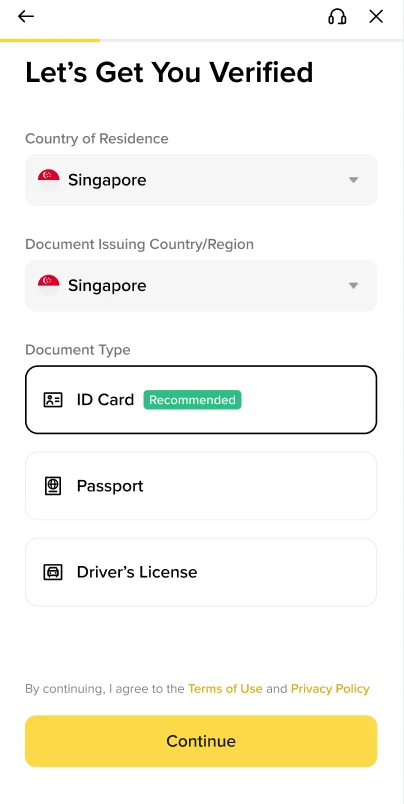
આ 2026 Binance FAQની real interface image છે. Singapore માત્ર official example છે; તમારા regionમાં સમાન document options હોવા જરૂરી નથી.
Verificationમાં ત્રણ અલગ facts હોય છે:
- Country of Residence: તમે અત્યારે કયા દેશમાં રહો છો.
- Nationality: તમારી નાગરિકતા.
- Document Issuing Country/Region: ID કયા દેશ/authorityએ આપ્યું.
આ ત્રણ values ક્યારેક સમાન હોય છે, પરંતુ હંમેશાં નહીં. Travel locationને residence ગણવી, nationalityને issuing country માની લેવી અથવા available document મેળવવા માટે ખોટો region પસંદ કરવો verificationની સમસ્યા ઉકેલતું નથી.
Binanceની page જે document types બતાવે તેમાંથી જ exact type પસંદ કરો. Official FAQ કહે છે કે ઘણા usersને passport, ID card અથવા driver’s licenseનો વિકલ્પ મળી શકે છે, પરંતુ country પ્રમાણે options બદલાય છે. તમારા page પર કોઈ type ઉપલબ્ધ ન હોય તો false region પસંદ ન કરો; official Support Centerમાં eligibility પૂછો.
Check 2: Upload original, valid અને complete IDનું છે?
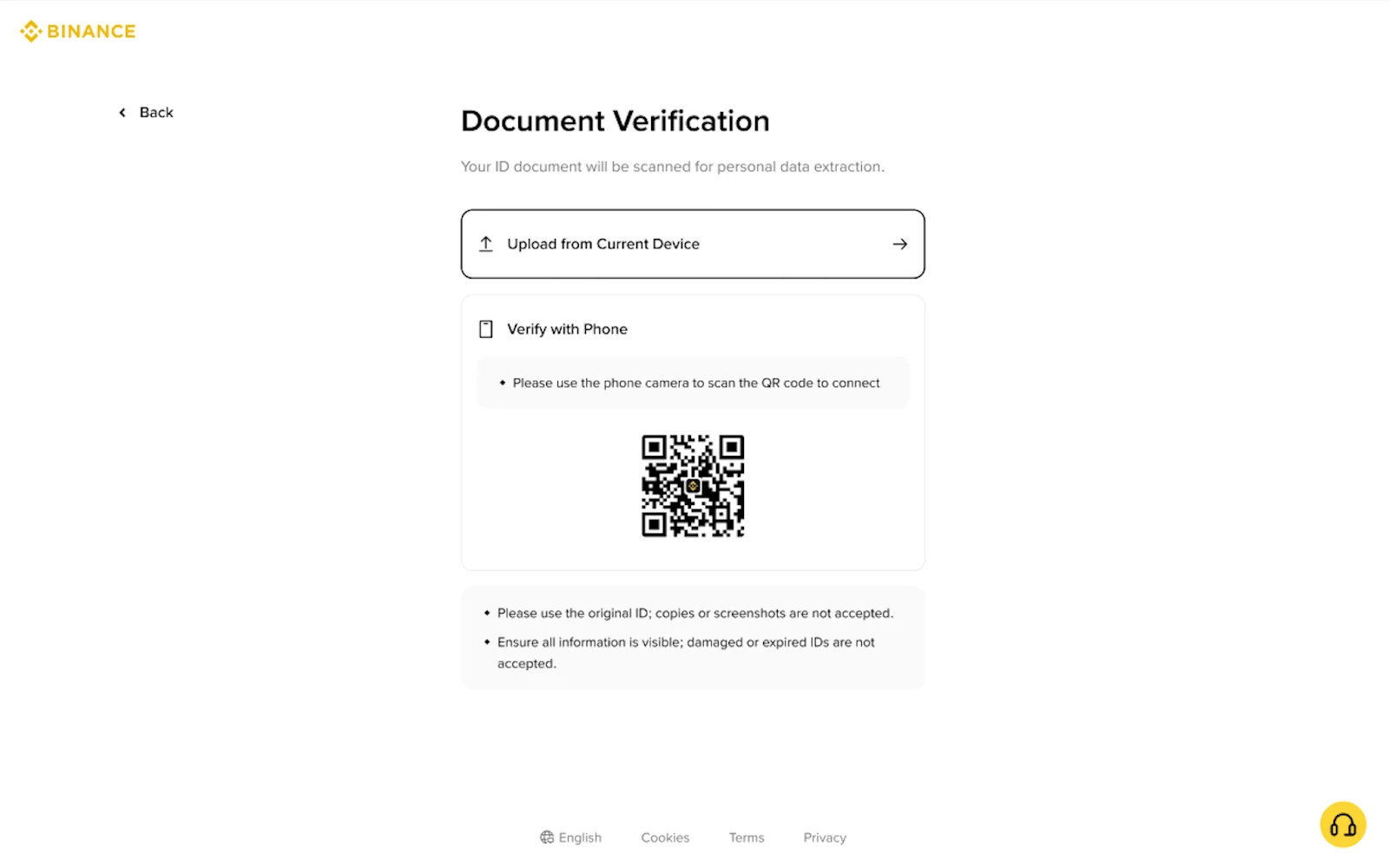
Official screen ત્રણ rules સ્પષ્ટ લખે છે:
- Original ID વાપરો; copy કે screenshot accepted નથી.
- તમામ information visible હોવી જોઈએ.
- Damaged અથવા expired ID accepted નથી.
ID card અથવા driver’s licenseની front અને back sides હોય તો Binance flow બંને sides upload કરવા કહે છે. Front perfect અને back missing હોય તો submission complete નથી.
All information visibleને practical checklistમાં ફેરવો:
- ચારેય corners frameમાં છે;
- finger, clip અથવા shadow textને cover નથી કરતી;
- plastic surface પર glare name, photo અથવા ID numberને ઢાંકતું નથી;
- camera focus પછી text zoom કરતાં readable છે;
- photo messaging appમાંથી forward કરીને compress કરેલી નથી;
- document ફાટેલું, heavily scratched કે expired નથી.
આ checklist official visibility rule પરથી practical inference છે; Binanceએ public fixed pixel size અથવા “5 mm border” rule જાહેર કર્યો નથી. તેથી third-party website બતાવતી ચોક્કસ magic measurementને official requirement ન માનો.
Image edit, filter, sharpen, remove-background અથવા text correction ન કરો. Better result માટે original documentને ફરી photograph કરો.
Check 3: Photo clear છે, પરંતુ machine-readable પણ છે?
આંખે text દેખાય તે પૂરતું નથી. OCR અને document detection માટે stable capture જરૂરી છે. Retake પહેલાં:
- Camera lens સાફ કરો અને rear camera વાપરો.
- IDને plain, contrasting background પર flat રાખો.
- Light બંને તરફથી સમાન આવે, સીધી flash glare ન બનાવે.
- Phone documentની ઉપર parallel રાખો; tilted perspective ટાળો.
- Focus lock થવા દો અને ત્યાર બાદ capture કરો.
- Capture પછી name, date of birth, number અને expiry zoom કરીને વાંચો.
Official page “Upload from Current Device” અથવા phoneથી QR connection બતાવી શકે છે. Manual upload option country પ્રમાણે ઉપલબ્ધ હોય છે. QR અથવા upload screen કામ ન કરે તો unofficial file-sharing link વાપરવાને બદલે official app/device change કરો.
Check 4: Livenessમાં camera, light કે face obstruction problem છે?
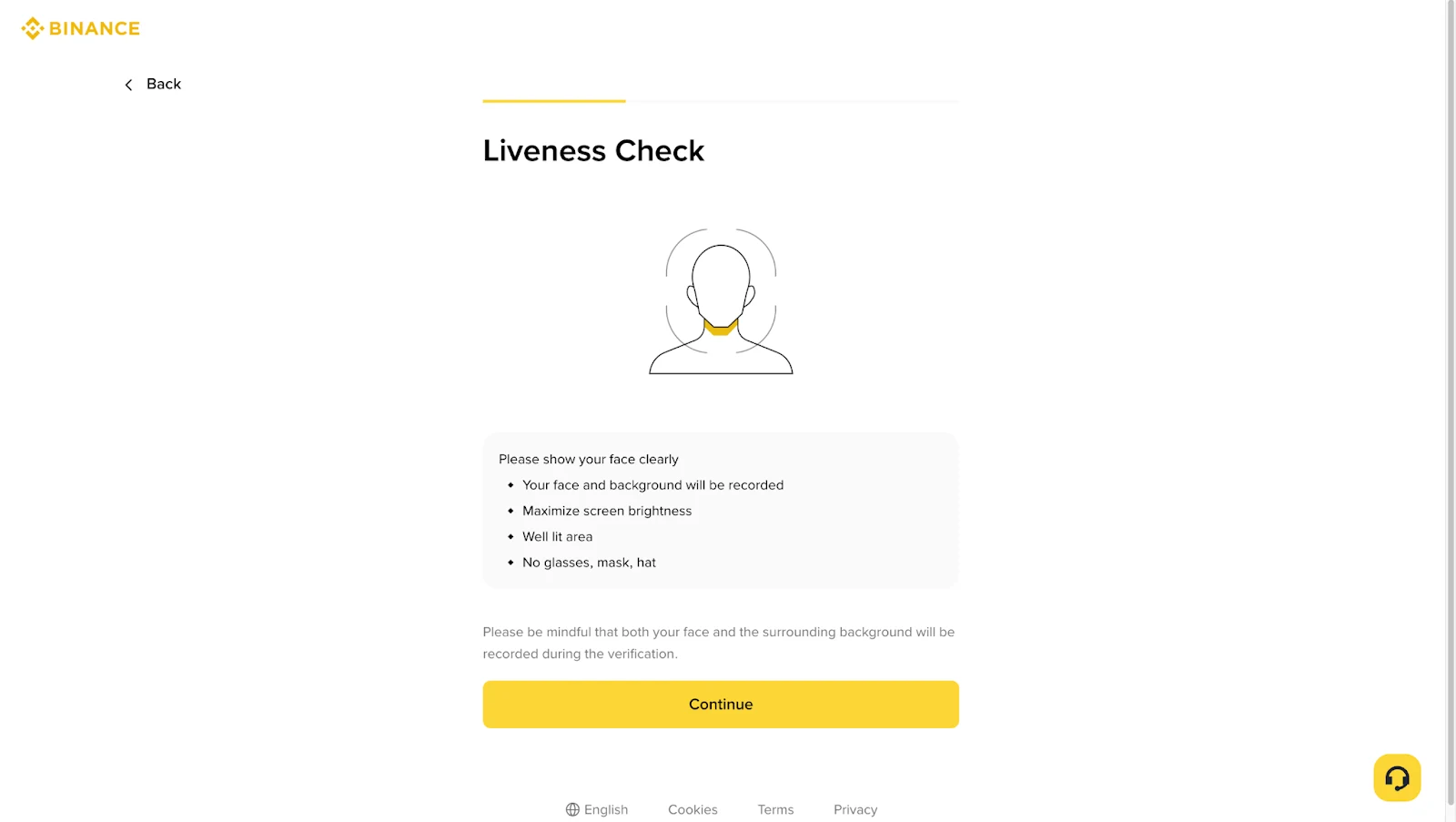
Liveness એક saved selfie upload નથી. System live camera દ્વારા face અને ID photo વચ્ચે match તથા real-person movement check કરે છે. Binance official instructions મુજબ camera access enable હોવો જોઈએ; face clear અને centered, eyes open, sufficient lighting, અને glasses, hat, mask અથવા filter વગર verification કરવી.
Retry sequence:
- Phone settingsમાં Binance app/browserને camera permission છે કે નહીં જુઓ.
- Beauty mode, virtual background, filter અને camera વાપરતી બીજી apps બંધ કરો.
- Window પાછળ નહીં, તમારા સામે soft light રાખો.
- Camera eye level પર રાખો અને full face frameમાં રાખો.
- Screen કહે ત્યારે જ blink અથવા head movement કરો.
- Process દરમિયાન app quit કે browser refresh ન કરો.
Black screen અથવા repeated technical error આવે તો device model, operating system, Binance app/browser version, time અને exact error લખી રાખો. Official supportને diagnostic detail આપો, પરંતુ social-media “agent”ને face video, OTP કે screen-control permission ન આપો.
Check 5: Name અને date ID સાથે exact match છે?
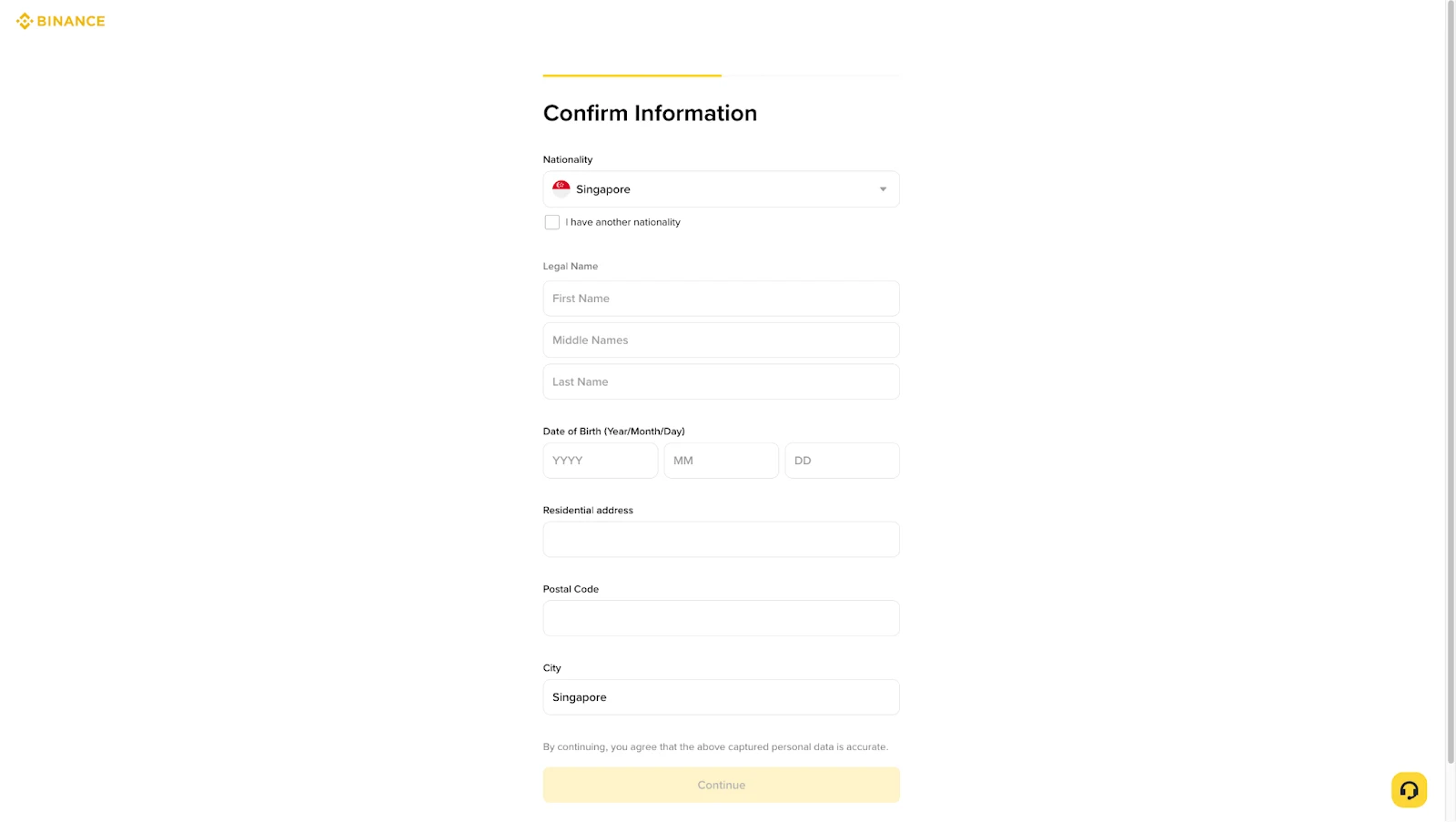
Binance process personal information confirm કરાવે છે અને official FAQ કહે છે કે entered information ID સાથે consistent હોવી જોઈએ; confirm થયા પછી તેને સીધી રીતે બદલી શકાતી નથી.
Submit પહેલાં document સામે રાખીને તપાસો:
- Legal Nameમાં first, middle અને last nameનું exact official spelling છે?
- Interface orderને કારણે surname અને given name ઊલટાં નથી?
- Local script અને Roman spellingમાંથી page જે ઓળખી શકે તે document-backed version છે?
- Date of Birthમાં year/month/day order સાચો છે?
- Nationality, residence અને issuing country અલગ facts તરીકે સાચાં છે?
- Address માંગવામાં આવે તો proof-of-address સાથે match કરે છે?
Nickname, shortened name, married-name change અથવા transliteration issue હોય તો guess કરીને નવી spelling ન બનાવો. Binance FAQ Update Identity flowમાં name/document change અને local-language IDથી system-recognizable language document તરફ update જેવી reasons દર્શાવે છે.
Pending, resubmit કે support—કઈ route પસંદ કરવી?
Pending અને 48 કલાકથી ઓછો સમય
Official page અને Email check કરો. 48 hours “usually reviewed” છે, guaranteed deadline નહીં. Additional request ન હોય તો duplicate submission ન બનાવો.
Clear rejection reason મળ્યો
Reasonને એક categoryમાં મૂકો: document eligibility, image, liveness, information mismatch અથવા technical issue. માત્ર એ category સુધારી resubmit કરો અને new outcome note કરો.
Information સાચી છે છતાં repeated failure
Official Support Center ખોલો. Error text, attempt time, device/app version અને તમે કયા step સુધી પહોંચ્યા તે આપો. Full ID image સામાન્ય chatમાં આપવાની જગ્યાએ support agent બતાવે તે secure in-product upload flow જ વાપરો.
Already verified personal account હોઈ શકે
Binance FAQ મુજબ એક verified personal account હોય ત્યારે second personal verificationને સામાન્ય workaround માનવું નહીં. Old account recovery, entity account અથવા official sub-account functionમાંથી યોગ્ય route પસંદ કરવા support લો.
KYC data અંગે privacy સમજો
Binanceની 5 January 2026 Privacy Notice મુજબ identity verification દરમિયાન full name, date of birth, address, government ID, photo, video અને proof of residence જેવી information collect થઈ શકે છે. Local law અને consent પ્રમાણે selfie/videoમાંથી facial scan કાઢીને government ID photo સાથે compare કરાતી biometric information પણ process થઈ શકે છે.
આથી બે rules રાખો:
- Verification ફક્ત typed
binance.comdomain અથવા official appમાં કરો. - ID, selfie, biometric video, OTP, password અને recovery details કોઈ referral owner, Telegram helper અથવા paid “KYC service”ને ન આપો.
Verified account ખરીદવું, બીજા વ્યક્તિનું ID વાપરવું અથવા address/region બનાવટી બતાવવું account ownership અને compliance problem વધારે છે. CoinPrimer કે કોઈ inviter KYC approve કરી શકતો નથી.
Retry પહેલાં final checklist
| Layer | Ready હોવાનો અર્થ |
|---|---|
| Status | Pending નહીં, resubmit/additional request સ્પષ્ટ છે |
| Region | Residence, nationality અને issuing country સાચાં છે |
| Document | Page-supported type, original, valid, undamaged |
| Capture | Front/back complete, corners visible, focus sharp, no glare |
| Liveness | Camera access, clear centered face, good light, no filter/cover |
| Information | Legal name અને DOB ID સાથે exact match |
| Security | Submission official app/siteમાં, third party પાસે copy નહીં |
Verification complete થયા પછી Binance Buy, Deposit, Transfer અને Withdraw વચ્ચેનો ફરક સમજીને fund કરો અને deposit પહેલાંની account security checklist પૂર્ણ કરો.
Binance account હજી બનાવ્યું નથી?
BI27XB92 referral registration guideમાં official domain અને benefit check કરવાની રીત છે. અમારી verified official invite link https://www.binance.com/join?ref=BI27XB92 અને code BI27XB92 છે.
Registration page “Up to 20% Trade Rebates” બતાવે છે—એનો અર્થ વધુમાં વધુ 20% trading-fee rebate, guaranteed fixed 20% નહીં. Eligibility અને final rate registration page તથા Binance terms પર આધારિત છે. Eligible registration થાય તો CoinPrimerને referral commission મળી શકે છે; referral KYC decisionને અસર કરતું નથી.
Official sources અને check date
- Binance Support: How to Complete Identity Verification for a Personal Account
- Binance Academy: What Is KYC?
- Binance Privacy Notice, 5 January 2026
- ચાર product screenshots Binance official FAQમાં linked official CDN originals છે. WebPમાં બદલતાં પહેલાં name, ID number, Email, UID, IP, token, cookie અને API key માટે manually checked હતા; કોઈ real personal identity detail નથી.
છેલ્લી ચકાસણી: 2 ઑગસ્ટ 2026 (UTC+8). Supported documents, verification level, review time અને regional rules બદલાઈ શકે છે; logged-in Identification page અંતિમ source છે.